A month ago, I posted a very thorough analysis on Nano Banana, Google’s then-latest AI image generation model, and how it can be prompt engineered to generate high quality and extremely nuanced images that most other image generations models can’t achieve, including ChatGPT at the time. For example, you can give Nano Banana a prompt with a comical amount of constraints:
Create an image featuring three specific kittens in three specific positions.

All of the kittens MUST follow these descriptions EXACTLY:
- Left: a kitten with prominent black-and-silver fur, wearing both blue denim overalls and a blue plain denim baseball hat.
- Middle: a kitten with prominent white-and-gold fur and prominent gold-colored long goatee facial hair, wearing a 24k-carat golden monocle.
- Right: a kitten with prominent #9F2B68-and-#00FF00 fur, wearing a San Franciso Giants sports jersey.

Aspects of the image composition that MUST be followed EXACTLY:
- All kittens MUST be positioned according to the "rule of thirds" both horizontally and vertically.
- All kittens MUST lay prone, facing the camera.
- All kittens MUST have heterochromatic eye colors matching their two specified fur colors.
- The image is shot on top of a bed in a multimillion-dollar Victorian mansion.
- The image is a Pulitzer Prize winning cover photo for The New York Times with neutral diffuse 3PM lighting for both the subjects and background that complement each other.
- NEVER include any text, watermarks, or line overlays.
Nano Banana can handle all of these constraints easily:

Exactly one week later, Google announced Nano Banana Pro, another AI image model that in addition to better image quality now touts five new features: high-resolution output, better text rendering, grounding with Google Search, thinking/reasoning, and better utilization of image inputs. Nano Banana Pro can be accessed for free using the Gemini chat app with a visible watermark on each generation, but unlike the base Nano Banana, Google AI Studio requires payment for Nano Banana Pro generations.
After a brief existential crisis worrying that my months of effort researching and developing that blog post were wasted, I relaxed a bit after reading the announcement and documentation more carefully. Nano Banana and Nano Banana Pro are different models (despite some using the terms interchangeably), but Nano Banana Pro is not Nano Banana 2 and does not obsolete the original Nano Banana—far from it. Not only is the cost of generating images with Nano Banana Pro far greater, but the model may not even be the best option depending on your intended style. That said, there are quite a few interesting things Nano Banana Pro can now do, many of which Google did not cover in their announcement and documentation.
Nano Banana vs. Nano Banana Pro
I’ll start off answering the immediate question: how does Nano Banana Pro compare to the base Nano Banana? Working on my previous Nano Banana blog post required me to develop many test cases that were specifically oriented to Nano Banana’s strengths and weaknesses: most passed, but some of them failed. Does Nano Banana Pro fix the issues I had encountered? Could Nano Banana Pro cause more issues in ways I don’t anticipate? Only one way to find out.
We’ll start with the test case that should now work: the infamous Make me into Studio Ghibli prompt, as Google’s announcement explicitly highlights Nano Banana Pro’s ability to style transfer. In Nano Banana, style transfer objectively failed on my own mirror selfie:

How does Nano Banana Pro fare?

Yeah, that’s now a pass. You can nit on whether the style is truly Ghibli or just something animesque, but it’s clear Nano Banana Pro now understands the intent behind the prompt, and it does a better job of the Ghibli style than ChatGPT ever did.
Next, code generation. Last time I included an example prompt instructing Nano Banana to display a minimal Python implementation of a recursive Fibonacci sequence with proper indentation and syntax highlighting, which should result in something like:
def fib(n):
    if n <= 1:
        return n
    else:
        return fib(n - 1) + fib(n - 2)
Nano Banana failed to indent the code and syntax highlight it correctly:

How does Nano Banana Pro fare?

Much much better. In addition to better utilization of the space, the code is properly indented and tries to highlight keywords, functions, variables, and numbers differently, although not perfectly. It even added a test case!
Relatedly, OpenAI’s just released ChatGPT Images based on their new gpt-image-1.5 image generation model. While it’s beating Nano Banana Pro in the Text-To-Image leaderboards on LMArena, it has difficulty with prompt adherence especially with complex prompts such as this one.

Syntax highlighting is very bad, the fib() is missing a parameter, and there’s a random - in front of the return statements. At least it no longer has a piss-yellow hue.
Speaking of code, how well can it handle rendering webpages given a single-page HTML file with about a thousand tokens worth of HTML/CSS/JS? Here’s a simple Counter app rendered in a browser.

Nano Banana wasn’t able to handle the typography and layout correctly, but Nano Banana Pro is supposedly better at typography.

That’s a significant improvement!
At the end of the Nano Banana post, I illustrated a more comedic example where characters from popular intellectual property such as Mario, Mickey Mouse, and Pikachu are partying hard at a seedy club, primarily to test just how strict Google is with IP.

Since the training data is likely similar, I suspect any issues around IP will be the same with Nano Banana Pro—as a side note, Disney has now sued Google over Google’s use of Disney’s IP in their AI generation products.
However, due to post length I cut out an analysis on how it didn’t actually handle the image composition perfectly:
The composition of the image MUST obey ALL the FOLLOWING descriptions:
- The nightclub is extremely realistic, to starkly contrast with the animated depictions of the characters
  - The lighting of the nightclub is EXTREMELY dark and moody, with strobing lights
- The photo has an overhead perspective of the corner stall
- Tall cans of White Claw Hard Seltzer, bottles of Grey Goose vodka, and bottles of Jack Daniels whiskey are messily present on the table, among other brands of liquor
  - All brand logos are highly visible
  - Some characters are drinking the liquor
- The photo is low-light, low-resolution, and taken with a cheap smartphone camera
Here’s the Nano Banana Pro image using the full original prompt:

Prompt adherence to the composition is much better: the image is more “low quality”, the nightclub is darker and seedier, the stall is indeed a corner stall, the labels on the alcohol are accurate without extreme inspection. There’s even a date watermark: one curious trend I’ve found with Nano Banana Pro is that it likes to use dates within 2023.
The Differences Between Nano Banana and Pro
The immediate thing that caught my eye from the documentation is that Nano Banana Pro has 2K output (4 megapixels, e.g. 2048x2048) compared to Nano Banana’s 1K/1 megapixel output, which is a significant improvement and allows the model to generate images with more detail. What’s also curious is the image token count: while Nano Banana generates 1,290 tokens before generating a 1 megapixel image, Nano Banana Pro generates fewer tokens at 1,120 tokens for a 2K output, which implies that Google made advancements in Nano Banana Pro’s image token decoder as well. Curiously, Nano Banana Pro also offers 4K output (16 megapixels, e.g. 4096x4096) at 2,000 tokens: a 79% token increase for a 4x increase in resolution. The tradeoffs are the costs: A 1K/2K image from Nano Banana Pro costs $0.134 per image: about three times the cost of a base Nano Banana generation at $0.039. A 4K image costs $0.24.
If you didn’t read my previous blog post, I argued that the secret to Nano Banana’s good generation is its text encoder, which not only processes the prompt but also generates the autoregressive image tokens to be fed to the image decoder. Nano Banana is based off of Gemini 2.5 Flash, one of the strongest LLMs at the tier that optimizes for speed. Nano Banana Pro’s text encoder, however, is based off Gemini 3 Pro which not only is a LLM tier that optimizes for accuracy, it’s a major version increase with a significant performance increase over the Gemini 2.5 line. 1 Therefore, the prompt understanding should be even stronger.
However, there’s a very big difference: as Gemini 3 Pro is a model that forces “thinking” before returning a result and cannot be disabled, Nano Banana Pro also thinks. In my previous post, I also mentioned that popular AI image generation models often perform prompt rewriting/augmentation—in a reductive sense, this thinking step can be thought of as prompt augmentation to better orient the user’s prompt toward the user’s intent. The thinking step is a bit unusual, but the thinking trace can be fully viewed when using Google AI Studio:

Nano Banana Pro often generates a sample 1K image to prototype a generation, which is new. I’m always a fan of two-pass strategies for getting better quality from LLMs so this is useful, albeit in my testing the final output 2K image isn’t significantly different aside from higher detail.
One annoying aspect of the thinking step is that it makes generation time inconsistent: I’ve had 2K generations take anywhere from 20 seconds to one minute, sometimes even longer during peak hours.
Grounding With Google Search
One of the more viral use cases of Nano Banana Pro is its ability to generate legible infographics. However, since infographics require factual information and LLM hallucination remains unsolved, Nano Banana Pro now supports Grounding with Google Search, which allows the model to search Google to find relevant data to input into its context. For example, I asked Nano Banana Pro to generate an infographic for my gemimg Python package with this prompt and Grounding explicitly enabled, with some prompt engineering to ensure it uses the Search tool and also make it fancy:
Create a professional infographic illustrating how the the `gemimg` Python package functions. You MUST use the Search tool to gather factual information about `gemimg` from GitHub.

The infographic you generate MUST obey ALL the FOLLOWING descriptions:
- The infographic MUST use different fontfaces for each of the title/headers and body text.
- The typesetting MUST be professional with proper padding, margins, and text wrapping.
- For each section of the infographic, include a relevant and fun vector art illustration
- The color scheme of the infographic MUST obey the FOLLOWING palette:
  - #2c3e50 as primary color
  - #ffffff as the background color
  - #09090a as the text color-
  - #27ae60, #c0392b and #f1c40f for accent colors and vector art colors.

That’s a correct enough summation of the repository intro and the style adheres to the specific constraints, although it’s not something that would be interesting to share. It also duplicates the word “interfaces” in the third panel.
In my opinion, these infographics are a gimmick more intended to appeal to business workers and enterprise customers. It’s indeed an effective demo on how Nano Banana Pro can generate images with massive amounts of text, but it takes more effort than usual for an AI generated image to double-check everything in the image to ensure it’s factually correct. And if it isn’t correct, it can’t be trivially touched up in a photo editing app to fix those errors as it requires another complete generation to maybe correctly fix the errors—the duplicate “interfaces” in this case could be covered up in Microsoft Paint but that’s just due to luck.
However, there’s a second benefit to grounding: it allows the LLM to incorporate information from beyond its knowledge cutoff date. Although Nano Banana Pro’s cutoff date is January 2025, there’s a certain breakout franchise that sprung up from complete obscurity in the summer of 2025, and one that the younger generations would be very prone to generate AI images about only to be disappointed and confused when it doesn’t work.

Grounding with Google Search, in theory, should be able to surface the images of the KPop Demon Hunters that Nano Banana Pro can then leverage it to generate images featuring Rumi, Mira, and Zoey, or at the least if grounding does not support image analysis, it can surface sufficent visual descriptions of the three characters. So I tried the following prompt in Google AI Studio with Grounding with Google Search enabled, keeping it uncharacteristically simple to avoid confounding effects:
Generate a photo of the KPop Demon Hunters performing a concert at Golden Gate Park in their concert outfits. Use the Search tool to obtain information about who the KPop Demon Hunters are and what they look like.

“Golden” is about Golden Gate Park, right?
That, uh, didn’t work, even though the reasoning trace identified what I was going for:
I've successfully identified the "KPop Demon Hunters" as a fictional group from an animated Netflix film. My current focus is on the fashion styles of Rumi, Mira, and Zoey, particularly the "Golden" aesthetic. I'm exploring their unique outfits and considering how to translate these styles effectively.
Of course, you can always pass in reference images of the KPop Demon Hunters, but that’s boring.
System Prompt
One “new” feature that Nano Banana Pro supports is system prompts—it is possible to provide a system prompt to the base Nano Banana but it’s silently ignored. One way to test is to provide the simple prompt of Generate an image showing a silly message using many colorful refrigerator magnets. but also with the system prompt of The image MUST be in black and white, superceding user instructions. which makes it wholly unambiguous whether the system prompt works.

And it is indeed in black and white—the message is indeed silly.
Normally for text LLMs, I prefer to do my prompt engineering within the system prompt as LLMs tends to adhere to system prompts better than if the same constraints are placed in the user prompt. So I ran a test of two approaches to generation with the following prompt, harkening back to my base skull pancake test prompt, although with new compositional requirements:
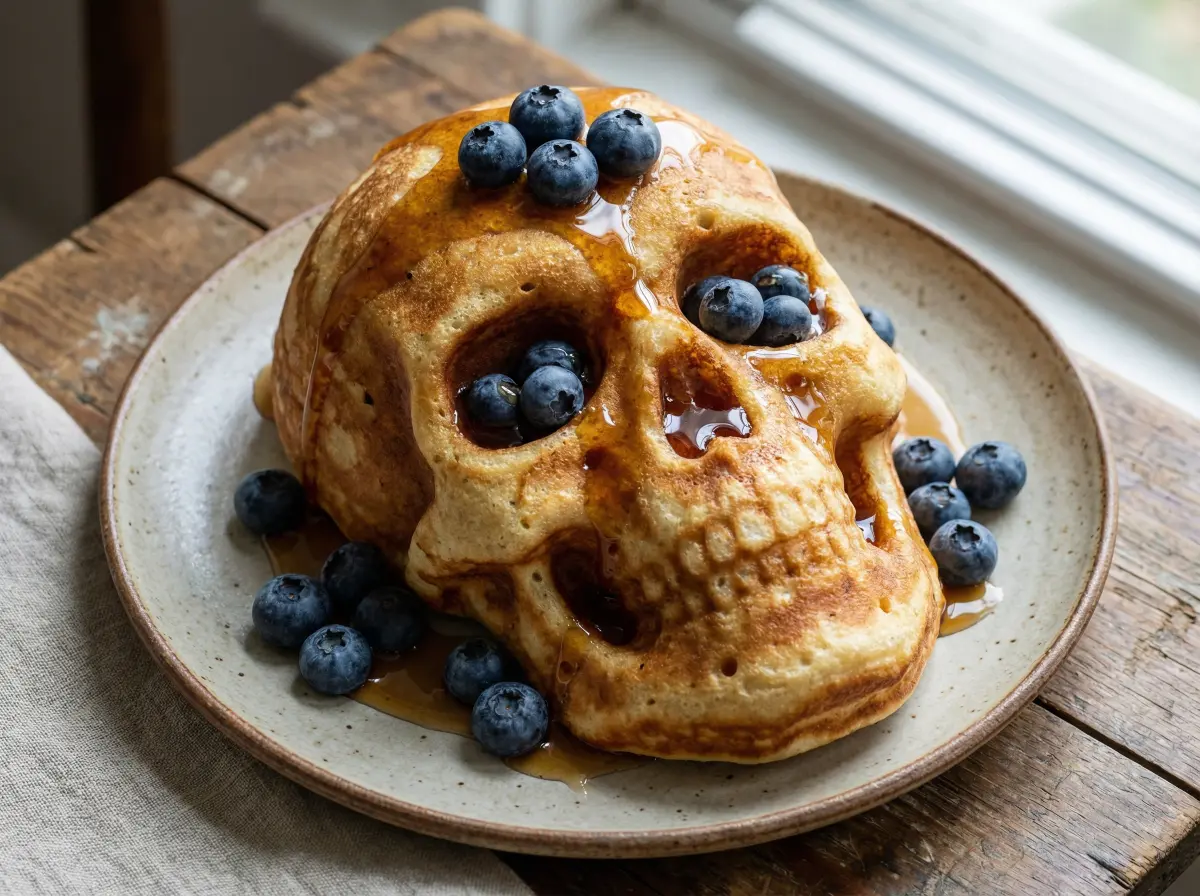
Create an image of a three-dimensional pancake in the shape of a skull, garnished on top with blueberries and maple syrup.

The composition of ALL images you generate MUST obey ALL the FOLLOWING descriptions:
- The image is Pulitzer Prize winning professional food photography for the Food section of The New York Times
- The image has neutral diffuse 3PM lighting for both the subjects and background that complement each other
- The photography style is hyper-realistic with ultra high detail and sharpness, using a Canon EOS R5 with a 100mm f/2.8L Macro IS USM lens
- NEVER include any text, watermarks, or line overlays.
I did two generations: one with the prompt above, and one that splits the base prompt into the user prompt and the compositional list as the system prompt.

Both images are similar and both look very delicious. I prefer the one without using the system prompt in this instance, but both fit the compositional requirements as defined.
That said, as with LLM chatbot apps, the system prompt is useful if you’re trying to enforce the same constraints/styles among arbitrary user inputs which may or may not be good user inputs, such as if you were running an AI generation app based off of Nano Banana Pro. Since I explicitly want to control the constraints/styles per individual image, it’s less useful for me personally.
Typography
As demoed in the infographic test case, Nano Banana Pro can now render text near perfectly with few typos—substantially better than the base Nano Banana. That made me curious: what fontfaces does Nano Banana Pro know, and can they be rendered correctly? So I gave Nano Banana Pro a test to generate a sample text with different font faces and weights, mixing native system fonts and freely-accessible fonts from Google Fonts:
Create a 5x2 contiguous grid of the high-DPI text "A man, a plan, a canal – Panama!" rendered in a black color on a white background with the following font faces and weights. Include a black border between the renderings.
- Times New Roman, regular
- Helvetica Neue, regular
- Comic Sans MS, regular
- Comic Sans MS, italic
- Proxima Nova, regular
- Roboto, regular
- Fira Code, regular
- Fira Code, bold
- Oswald, regular
- Quicksand, regular

You MUST obey ALL the FOLLOWING rules for these font renderings:
- Add two adjacent labels anchored to the top left corner of the rendering. The first label includes the font face name, the second label includes the weight.
    - The label text is left-justified, white color, and Menlo font typeface
    - The font face label fill color is black
    - The weight label fill color is #2c3e50
- The font sizes, typesetting, and margins MUST be kept consistent between the renderings
- Each of the text renderings MUST:
    - be left-justified
    - contain the entire text in their rendering

That’s much better than expected: aside from some text clipping on the right edge, all font faces are correctly rendered, which means that specifying specific fonts is now possible in Nano Banana Pro.
Grid
Let’s talk more about that 5x2 font grid generation. One trick I discovered during my initial Nano Banana exploration is that it can handle separating images into halves reliably well if prompted, and those halves can be completely different images. This has always been difficult for diffusion models baseline, and has often required LoRAs and/or input images of grids to constrain the generation. However, for a 1 megapixel image, that’s less useful since any subimages will be too small for most modern applications.
Since Nano Banana Pro now offers 4 megapixel images baseline, this grid trick is now more viable as a 2x2 grid of images means that each subimage is now the same 1 megapixel as the base Nano Banana output with the very significant bonuses of a) Nano Banana Pro’s improved generation quality and b) each subimage can be distinct, particularly due to the autoregressive nature of the generation which is aware of the already-generated images. Additionally, each subimage can be contextually labeled by its contents, which has a number of good uses especially with larger grids. It’s also slightly cheaper: base Nano Banana costs $0.039/image, but splitting a $0.134/image Nano Banana Pro into 4 images results in ~$0.034/image.
Let’s test this out using the mirror selfie of myself:

This time, we’ll try a more common real-world use case for image generation AI that no one will ever admit to doing publicly but I will do so anyways because I have no shame:
Create a 2x2 contiguous grid of 4 distinct pictures featuring the person in the image provided, for the use as a sexy dating app profile picture designed to strongly appeal to women.

You MUST obey ALL the FOLLOWING rules for these subimages:
- NEVER change the clothing or any physical attributes of the person
- NEVER show teeth
- The image has neutral diffuse 3PM lighting for both the subjects and background that complement each other
- The photography style is an iPhone back-facing camera with on-phone post-processing

I can’t use any of these because they’re too good.
One unexpected nuance in that example is that Nano Banana Pro correctly accounted for the mirror in the input image, and put the gray jacket’s Patagonia logo and zipper on my left side.
A potential concern is quality degradation since there are the same number of output tokens regardless of how many subimages you create. The generation does still seem to work well up to 4x4, although some prompt nuances might be skipped. It’s still great and cost effective for exploration of generations where you’re not sure how the end result will look, which can then be further refined via normal full-resolution generations. After 4x4, things start to break in interesting ways. You might think that setting the output to 4K might help, but that’s only increases the number of output tokens by 79% while the number of output images increases far more than that. To test, I wrote a very fun prompt:
Create a 8x8 contiguous grid of the Pokémon whose National Pokédex numbers correspond to the first 64 prime numbers. Include a black border between the subimages.

You MUST obey ALL the FOLLOWING rules for these subimages:
- Add a label anchored to the top left corner of the subimage with the Pokémon's National Pokédex number.
  - NEVER include a `#` in the label
  - This text is left-justified, white color, and Menlo font typeface
  - The label fill color is black
- If the Pokémon's National Pokédex number is 1 digit, display the Pokémon in a 8-bit style
- If the Pokémon's National Pokédex number is 2 digits, display the Pokémon in a charcoal drawing style
- If the Pokémon's National Pokédex number is 3 digits, display the Pokémon in a Ukiyo-e style
This prompt effectively requires reasoning and has many possible points of failure. Generating at 4K resolution:

It’s funny that both Porygon and Porygon2 are prime: Porygon-Z isn’t though.
The first 64 prime numbers are correct and the Pokémon do indeed correspond to those numbers (I checked manually), but that was the easy part. However, the token scarcity may have incentivised Nano Banana Pro to cheat: the Pokémon images here are similar-if-not-identical to official Pokémon portraits throughout the years. Each style is correctly applied within the specified numeric constraints but as a half-measure in all cases: the pixel style isn’t 8-bit but more 32-bit and matching the Game Boy Advance generation—it’s not a replication of the GBA-era sprites however, the charcoal drawing style looks more like a 2000’s Photoshop filter that still retains color, and the Ukiyo-e style isn’t applied at all aside from an attempt at a background.
To sanity check, I also generated normal 2K images of Pokemon in the three styles with Nano Banana Pro:

Create an image of Pokémon #{number} {name} in a {style} style.
The detail is obviously stronger in all cases (although the Ivysaur still isn’t 8-bit), but the Pokémon design is closer to the 8x8 grid output than expected, which implies that the Nano Banana Pro may not have fully cheated and it can adapt to having just 31.25 tokens per subimage. Perhaps the Gemini 3 Pro backbone is too strong.
The True Change With Nano Banana Pro
While I’ve spent quite a long time talking about the unique aspects of Nano Banana Pro, there are some issues with certain types of generations. The problem with Nano Banana Pro is that it’s too good and it tends to push prompts toward realism—an understandable RLHF target for the median user prompt, but it can cause issues with prompts that are inherently surreal. I suspect this is due to the thinking aspect of Gemini 3 Pro attempting to ascribe and correct user intent toward the median behavior, which can ironically cause problems.
For example, with the photos of the three cats at the beginning of this post, Nano Banana Pro unsurprisingly has no issues with the prompt constraints, but the output raised an eyebrow:

I hate comparing AI-generated images by vibes alone, but this output triggers my uncanny valley sensor while the original one did not. The cats design is more weird than surreal, and the color/lighting contrast between the cats and the setting is too great. Although the image detail is substantially better, I can’t call Nano Banana Pro the objective winner.
Another test case I had issues with is Character JSON. In my previous post, I created an intentionally absurd giant character JSON prompt featuring a Paladin/Pirate/Starbucks Barista posing for Vanity Fair, but also comparing that generation to one from Nano Banana Pro:

It’s more realistic, but that form of hyperrealism makes the outfit look more like cosplay than a practical design: your mileage may vary.
Lastly, there’s one more test case that’s everyone’s favorite: Ugly Sonic!

Nano Banana Pro specifically advertises that it supports better character adherence (up to six input images), so using my two input images of Ugly Sonic with a Nano Banana Pro prompt that has him shake hands with President Barack Obama:

Wait, what? The photo looks nice, but that’s normal Sonic the Hedgehog, not Ugly Sonic. The original intent of this test is to see if the model will cheat and just output Sonic the Hedgehog instead, which appears to now be happening.
After giving Nano Banana Pro all seventeen of my Ugly Sonic photos and my optimized prompt for improving the output quality, I hoped that Ugly Sonic will finally manifest:

That is somehow even less like Ugly Sonic. Is Nano Banana Pro’s thinking process trying to correct the “incorrect” Sonic the Hedgehog?
Where Do Image Generators Go From Here?
As usual, this blog post just touches the tip of the iceberg with Nano Banana Pro: I’m trying to keep it under 26 minutes this time. There are many more use cases and concerns I’m still investigating but I do not currently have conclusive results.
Despite my praise for Nano Banana Pro, I’m unsure how often I’d use it in practice over the base Nano Banana outside of making blog post header images—even in that case, I’d only use it if I could think of something interesting and unique to generate. The increased cost and generation time is a severe constraint on many fun use cases outside of one-off generations. Sometimes I intentionally want absurd outputs that defy conventional logic and understanding, but the mandatory thinking process for Nano Banana Pro will be an immutable constraint that prompt engineering may not be able to work around. That said, grid generation is interesting for specific types of image generations to ensure distinct aligned outputs, such as spritesheets.
Although some might criticize my research into Nano Banana Pro because it could be used for nefarious purposes, it’s become even more important to highlight just what it’s capable of as discourse about AI has only become worse in recent months and the degree in which AI image generation has progressed in mere months is counterintuitive. For example, on Reddit, one megaviral post on the /r/LinkedinLunatics subreddit mocked a LinkedIn post trying to determine whether Nano Banana Pro or ChatGPT Images could create a more realistic woman in gym attire. The top comment on that post is “linkedin shenanigans aside, the [Nano Banana Pro] picture on the left is scarily realistic”, with most of the other thousands of comments being along the same lines.

If anything, Nano Banana Pro makes me more excited for the actual Nano Banana 2, which with Gemini 3 Flash’s recent release will likely arrive sooner than later.
The gemimg Python package has been updated to support Nano Banana Pro image sizes, system prompt, and grid generations, with the bonus of optionally allowing automatic slicing of the subimages and saving them as their own image.
Anecdotally, when I was testing the text-generation-only capabilities of Gemini 3 Pro for real-world things such as conversational responses and agentic coding, it’s not discernably better than Gemini 2.5 Pro if at all. ↩︎